Gavior Journal · Software Engineering · 6 min read
SaaS Workflow Monitoring and Failure Recovery
SaaS workflow monitoring should show which business cases completed, which are waiting and who owns each failure. Recovery should resume the intended work without repeating completed side effects. Combine case-level status, an owned failure queue and reconciliation to detect both visible errors and missing outcomes.
Gavior Editorial Team
Software and automation editorial team
Published: 2026-10-28Updated: 2026-10-28
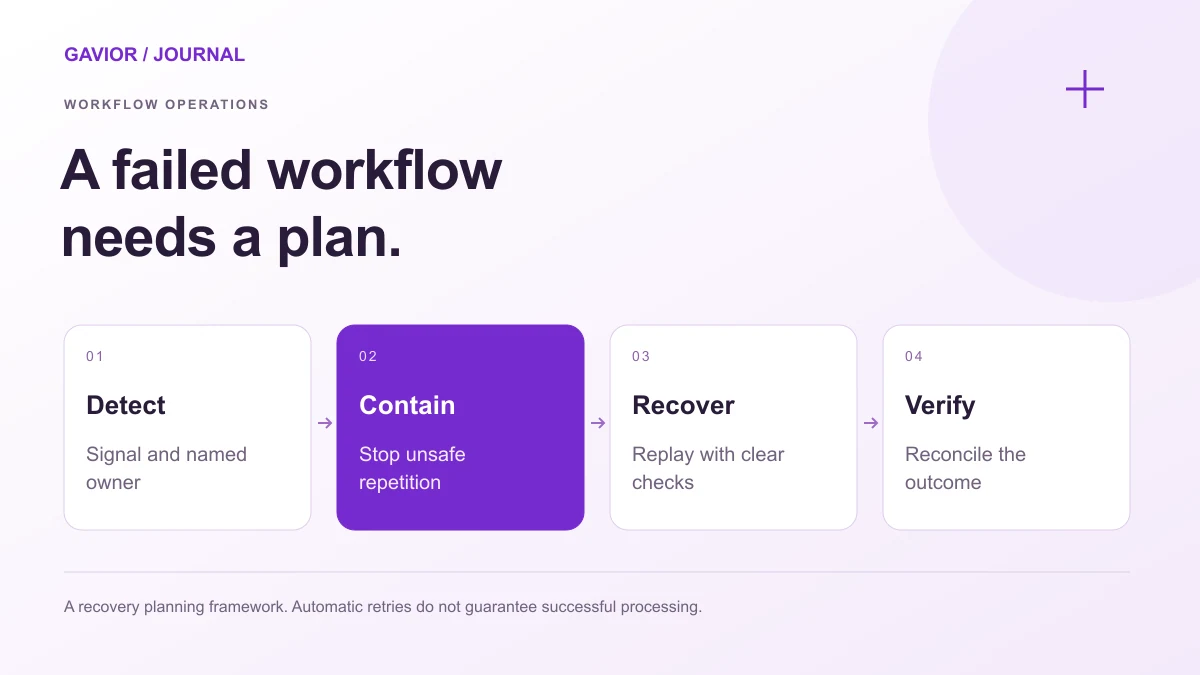
A recovery planning framework. Automatic retries do not guarantee successful or duplicate-free processing. View full-size image ↗
A server can be healthy while customers remain without access or approved requests never reach their destination. This guide covers the operating controls for a defined workflow. The broader process and integration scope belong in the .
Make your move
Ready to turn a better idea into a better business?
Start with the business completion condition. Then instrument the states between the trigger and that outcome. Distinguish cases that are actively processing, waiting for a person, waiting for a system and requiring intervention.
Signal
Operational question it answers
Context required
Accepted cases and completed cases
Is work entering faster than it finishes?
Comparable time window and case type
Age of oldest pending case
Has work stopped moving?
State, owner and last progress time
Cases exceeding their agreed deadline
Which customer commitments are at risk?
Relevant business deadline and priority
Failure queue by reason
What needs correction or recovery?
Affected reference and allowed next action
Repeated attempts per operation
Are retries hiding an unresolved fault?
Original operation ID and attempt history
Reconciliation mismatches
Did the intended business result actually occur?
Expected outcome and authoritative record
Platform metrics provide part of this view. AWS Step Functions monitoring guidance covers execution failures, timeouts, ownership and baseline monitoring. It also describes CloudWatch metric delivery as best effort. Keep a durable case record for business accounting rather than treating a metric chart as a complete transaction ledger.
Who should receive an alert and what must it contain?
Assign a business owner who can prioritise affected work and a technical owner who can diagnose the integration. Define coverage and escalation responsibilities in the handover rather than assuming an agency or internal team remains available indefinitely.
An actionable alert needs the workflow, affected case references, failure category, first occurrence, latest attempt and investigation link. Include the customer consequence when known. An expired integration credential needs a different response from a missing customer identifier.
Choose alert thresholds from expected operation and the agreed business deadline. Avoid paging someone for every retry when the workflow is recovering normally. Conversely, a quiet system needs investigation if scheduled work should have arrived but no cases were created.
Keep sensitive payloads and credentials out of notifications. The operator should reach an access-controlled view containing the context needed for their role.
What should the failure queue let an operator do?
The queue should preserve the original case, current state, completed steps, reason for stopping and permitted actions. Separate automatic retry from cases requiring corrected data, renewed access, cancellation or a business decision.
Record who claimed the case, who changed it and why it was closed. If multiple people can recover work, guard against concurrent actions. A “retry all” button without an eligibility check can turn a partial outage into duplicate customer messages or records.
Approval-related failures need particular care. An operation waiting for a decision is not the same as an approved operation that failed to execute. The SaaS approval workflow design checklist explains how to keep those states distinct.
How can a failed workflow be replayed safely?
Identify the logical business operation independently of each delivery attempt. Store its progress and check the destination's actual result before repeating an action whose outcome is uncertain. A timeout might mean the response was lost after the destination completed the request.
Where supported, use the provider's documented idempotency mechanism. Stripe's API guidance explains how idempotency keys support safe retries and describes different API-version behaviours. Check key lifetime, parameter matching and error behaviour for the specific endpoint; adding a key does not protect unrelated downstream actions.
Keep recovery tied to a known input and workflow version. AWS documents that Step Functions redrive resumes eligible unsuccessful Standard Workflow executions while retaining successful-step history and the original definition. Eligibility and state-specific behaviour still apply. Other platforms may provide different guarantees.
For a custom implementation, require equivalent clarity: which steps rerun, what input they use and how duplicate side effects are prevented.
When should the workflow compensate instead of retrying?
Retry a transient failure when the original action remains valid. If the business request has been cancelled or continuing would be wrong, an earlier action may need a separate corrective operation. Some ambiguous situations require a person to decide.
Microsoft's compensating transaction pattern describes application-specific recovery rather than assuming every distributed change can be rolled back to an earlier snapshot. Define the correction, its owner and how to recover if that correction also fails.
What would an incident check look like?
Hypothetical example: A paid subscription should create a workspace and assign onboarding. Workspace creation succeeds, but the task service is unavailable. This is an operating example, not a reported Gavior result.
The workflow records the workspace reference and marks onboarding assignment incomplete. Its alert identifies the affected customer and outstanding task. An operator confirms the subscription still requires onboarding and resumes task creation using the existing case and workspace references.
Recovery does not send another access invitation or create another workspace. After the task service returns, reconciliation checks that eligible subscriptions have the required workspace and onboarding task. The incident is closed after affected cases are accounted for, rather than when the external service merely responds again.
What should reconciliation and handover prove?
Reconciliation checks expected business outcomes independently of individual delivery attempts. Define the eligible population, comparison fields, acceptable delay and repair authority. The CRM and SaaS integration checklist covers the underlying ownership and matching contract when records span those systems.
Before handover, demonstrate a temporary outage, a lost response, repeated delivery, revoked access and a case that never entered the processing queue. Confirm each is detected, owned and recoverable under the agreed rules. Record the expected outcome and evidence used to close it.
Include alert destinations, credential owners, queue permissions, recovery instructions and the process for changing workflow versions. Gavior's DevOps services can support the operating setup alongside application engineering. Discuss workflow monitoring and recovery with the completion condition, known failure cases and current support responsibilities.
Frequently asked questions
Is uptime monitoring enough for a SaaS workflow?
No. Uptime indicates service availability. Workflow monitoring must also track business cases, pending states, overdue work and completion evidence. A reachable application can still leave individual cases incomplete.
Should every failed operation retry automatically?
No. Temporary availability failures may be retriable. Invalid data, revoked permissions, cancelled requests and uncertain side effects need different handling. Define retry eligibility, limits and escalation for each failure category.
Does replay mean restarting every workflow step?
Not necessarily. Recovery should follow recorded progress and the platform's documented behaviour. Determine which steps rerun and protect their side effects. Verify uncertain external outcomes before repeating work.
When is a workflow incident ready to close?
Close it after the service is stable and affected business cases have an agreed outcome. Record recovered, cancelled or manually resolved cases, check for missing results and document any remaining owned follow-up work.
G
Gavior Editorial Team
Software and automation editorial team at Gavior
The Gavior Editorial Team shares practical guidance on product design, software engineering, cloud delivery and AI automation.