
The account at a glance
A funded workspace puts balance, equity, performance and account status together in a clear dashboard.
A trader command center that brings funded accounts, challenge progress, trading rules and payout actions into one workspace.
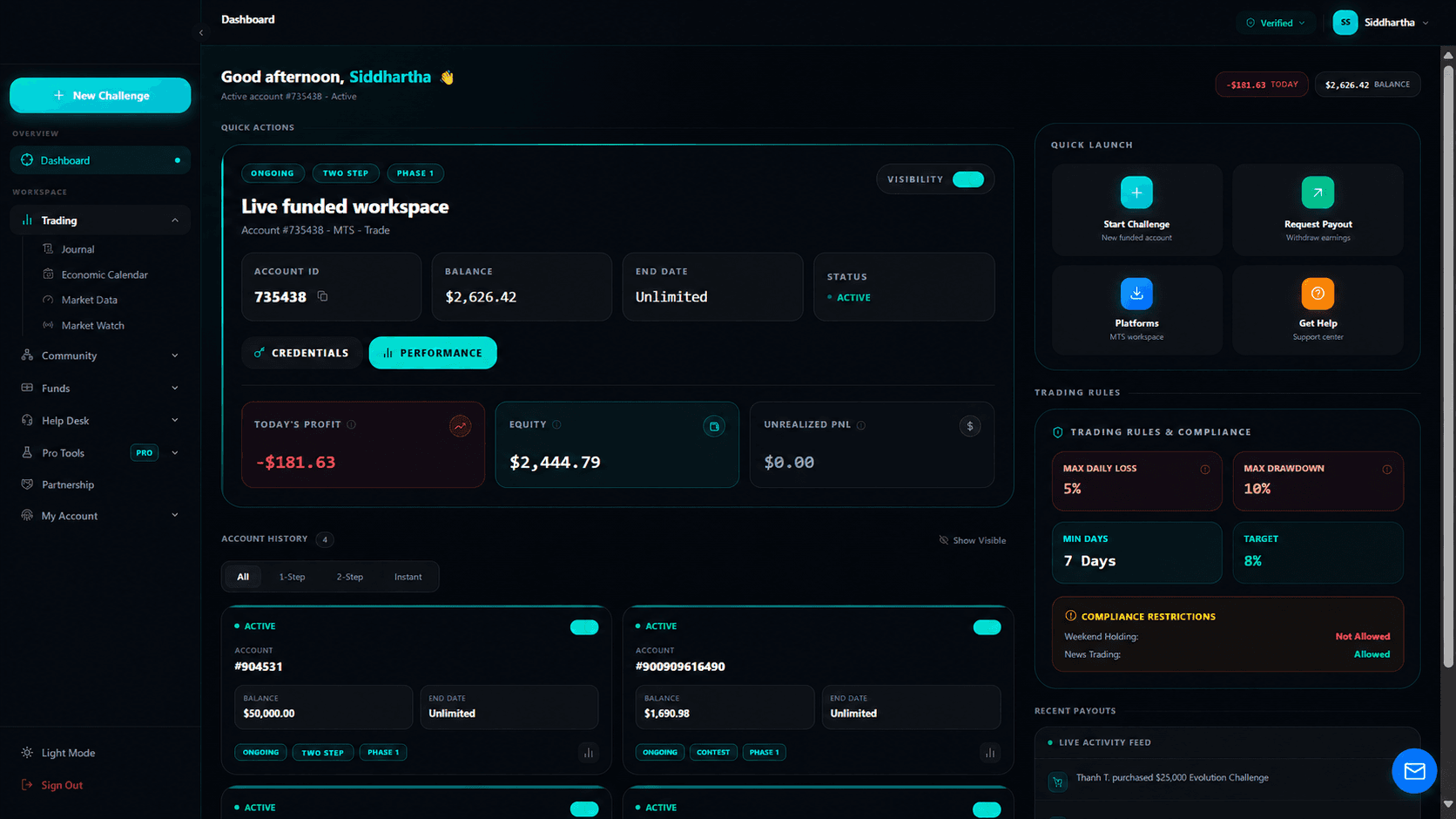
A funded workspace puts balance, equity, performance and account status together in a clear dashboard.
Challenge phases, trading limits and evaluation targets sit alongside the account they apply to.
Challenge entry, payout requests, platform access and support are available from the main workspace.
Client work · Product walkthrough
This client platform brings funded-account information, challenge stages, account rules and next actions into one trader workspace. The walkthrough explains the visible product workflow while keeping the client's identity private.
Based on the supplied, brand-anonymized interface presentation. The walkthrough does not establish the client's backend architecture, launch timeline or commercial results; account figures are part of the captured interface.
The funded workspace groups the active account identifier, balance, end date and status. Profit, equity and unrealized P&L sit nearby, while account history distinguishes other accounts. This gives the user context for the selected account before moving to credentials, performance or another task.
The interface presents challenge phase, daily-loss limits, maximum drawdown, minimum days and profit targets alongside account information. Restrictions such as weekend holding and news trading are shown in the same workspace. These are interface examples; the exact rule calculation and enforcement need to be specified and verified separately for each product.
The quick-launch area offers challenge entry, payout requests, platform access and support. Navigation also exposes journals, market tools, funds and account settings. When scoping a similar portal, each visible action needs a defined destination, permission rule and success or failure response, not only a clickable card.
Start with a customer task that crosses a small number of connected states, such as selecting an account and reviewing the requirements for a request. Define the source of the displayed data and the service that owns the request. Add further account types and tools only when the first journey has clear acceptance criteria.
A SaaS idea, a better client portal or your next mobile app. Tell us what your users need to do, and we’ll help define the next step.
What would you like to build?
Choose a starting point for your WhatsApp conversation.