Shopify vs Custom Next.js Ecommerce: A Buyer Decision Guide
Gavior Editorial Team
Commerce and engineering editorial team
Published: 2026-09-20Updated: 2026-11-09
Compare a Shopify theme, a headless Shopify storefront and custom commerce using operating needs, checkout constraints, ownership and total cost.
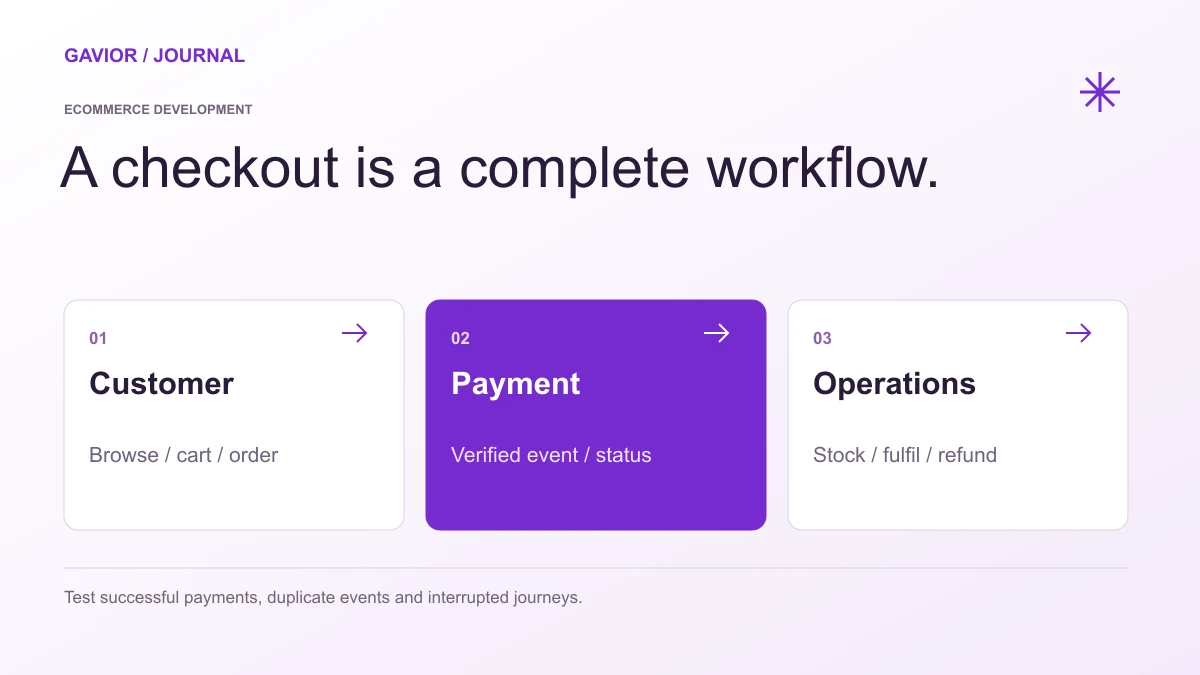
The order, payment and operational states should be reviewed as one workflow. View full-size image ↗
Shopify and Next.js solve different parts of an ecommerce system. Shopify provides a commerce platform; Next.js is an application framework that can be used for a custom storefront. A Next.js frontend can connect to Shopify, another commerce backend or custom order services. Choosing Next.js does not automatically remove platform subscriptions, payment charges or operating responsibilities.
Make your move
Ready to turn a better idea into a better business?
Disclosure: Gavior develops websites and commerce workflows. This guide explains how to compare architectures; it does not claim that custom development always wins, publish a universal price or guarantee a speed or revenue result.
Which three options are you actually comparing?
Option
What it means
Decision to review
Shopify with a theme
Storefront and commerce operations use Shopify's supported theme/platform approach
Whether its workflows and selected extensions meet your catalogue and buying needs
Headless Shopify with a custom frontend
A separately developed storefront connects to Shopify commerce services
Whether the additional frontend control justifies integration, preview and maintenance work
Custom storefront and commerce services
The selected application and backend implement the agreed commerce workflow
Who owns the order model, administration, integrations, reliability and ongoing changes
Shopify's custom shopping experiences documentation describes a separate frontend connected to its backend and checkout. A headless store can therefore retain Shopify dependencies. Ask the proposal to name the backend and checkout provider, not just the frontend framework.
Start with the buying and operating constraints
Write down the representative product, variants, prices, stock source, payment methods and fulfilment rules. Add the people who update the catalogue, reconcile payments and handle returns. Test those requirements against a supported platform before assuming that a custom build is necessary.
For an illustrative small homeware catalogue, an existing theme and carefully selected extensions may cover the required journey. A distributor with customer-specific order rules and an existing inventory system may need integration work or a different architecture. These are planning examples, not client results or automatic platform recommendations.
Use the India ecommerce launch checklist to turn those requirements into acceptance checks. If no requirement needs a separately maintained frontend, ask what concrete problem headless development would solve.
Check the exact checkout change before choosing a plan
“Custom checkout” can mean different things: brand styling, additional information, a new shipping rule or a change inside a payment step. Document the specific change and validate that the chosen architecture and provider permit it.
Shopify's checkout customization guide distinguishes standard customization from advanced features available on Shopify Plus. It is inaccurate to say that no checkout customization exists on other plans. A separate frontend also does not override the rules of the checkout service it uses.
For custom commerce, identify the payment provider's supported flow, security responsibilities, refund handling and reconciliation. Full responsibility for implementing a feature is a cost and maintenance decision, not proof that it will be better.
Compare costs using the same usage assumptions
Collect current prices for the chosen country, plan, providers and actual proposal. Avoid comparing a subscription alone with a custom build fee alone.
Cost area
What to record
Initial work
Design, development, catalogue import, integrations, testing and migration
Platform and extensions
Subscription, paid apps, themes and any usage-based charges
Payment
Provider fees and any applicable platform transaction charges for the chosen method
Infrastructure
Hosting, storage, email, monitoring and backup/recovery services
Ongoing delivery
Updates, incident handling, support capacity and future features
Business operations
Catalogue work, reconciliation, fulfilment and customer support
Shopify documents third-party transaction charges and app charges separately. Verify their applicability to the actual plan and payment methods. Replacing an app with custom code moves implementation and maintenance into the development scope; it does not establish zero recurring cost.
Compare a twelve-month period under the same estimated orders and usage, show one-time and recurring totals separately, and label variable costs. Treat uncertain integration work as an open dependency. No universal turnover threshold determines when a store should move to a custom system.
Measure performance on the implemented store
A framework name does not establish a Lighthouse score, Core Web Vitals result or faster checkout. Images, third-party scripts, data requests, caching and the real device/network context all affect the experience. Test representative category, product, cart and checkout journeys on the actual implementation.
The Next.js production checklist recommends production-like testing and pairing simulated Lighthouse checks with field data. Agree a test method and relevant budgets before acceptance. Do not transfer a score from a demo or another store to your project.
Agree ownership and handover in writing
Separate custom code from provider services and third-party licences. Record who owns the domain, store and payment accounts; what repository and theme access is provided; how products and orders can be exported; and which provider dependencies remain. Do not describe all Shopify work as zero ownership or assume every custom contract grants unrestricted rights.
For a headless build, include frontend deployment, preview/content workflows, API configuration and supported integration boundaries. For custom commerce, include order administration, recovery and maintenance responsibilities. A useful handover lets the next operator understand how the system is run, not just where its source files live.
When should you retain, extend or replace the current store?
Retain: the required journey works and the main issues can be addressed through content, configuration or focused improvements.
Extend: a specific integration or frontend requirement is justified, while existing commerce operations remain suitable.
Replace: documented limitations conflict with essential requirements and the migration benefit justifies its cost and risk.
Keep old product/category URLs, order history, customer access and the cutover plan in the decision. Use the ecommerce agency scorecard to compare evidence from potential teams.
Review Gavior's ecommerce development service, inspect published packages, or share your store requirements. Include the current store URL, a representative product, operational constraints and the decision you want to make. Scope, provider choices, price and timing need an agreed proposal; no architecture alone guarantees rankings or conversion gains.
G
Gavior Editorial Team
Commerce and engineering editorial team at Gavior
The Gavior Editorial Team publishes practical guidance on commerce workflows, websites and software delivery.